App guide
How to check your Almas water coupon balance
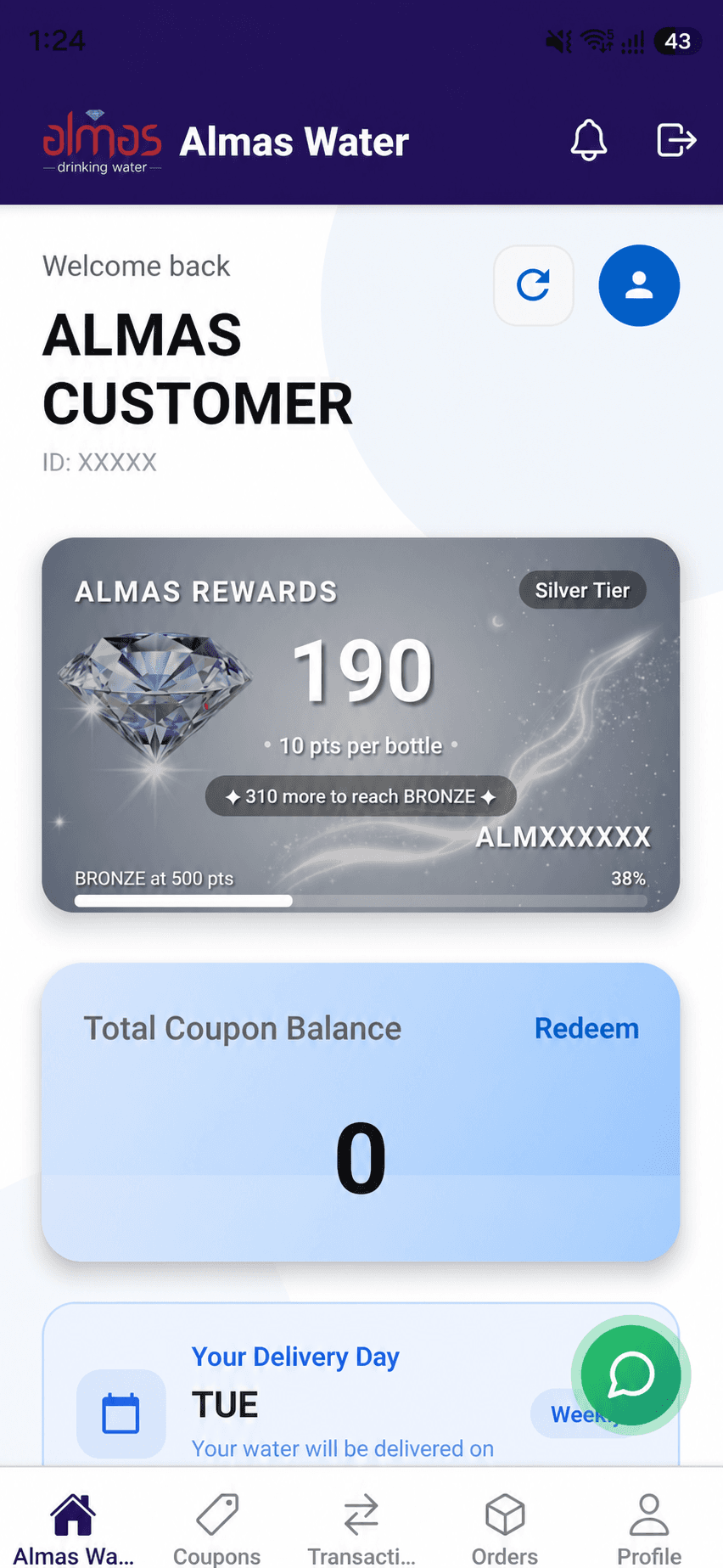
Use Almas Customer on the web or Android to view digital coupon information connected to your water-delivery account in Qatar.
Open the correct Almas Customer account
Use the Almas Customer web app or the official Android app and sign in with the account connected to the water-delivery service. Checking the correct customer account is important because coupon and delivery information is account-specific.
Review the balance and coupon information
The home experience includes a total coupon balance area. The Coupons screen provides the account's coupon information and request controls, allowing customers to review the digital record without carrying a paper book for app-managed plans.
- Check the total coupon balance
- Open Coupons for account details
- Review requests before submitting another
Request assistance when information looks different
If the customer name, coupon information, delivery details or expected balance does not match, avoid relying on the screenshot alone. Refresh the account and contact Almas with the customer details needed to verify the record securely.
Frequently asked
Quick answers
Can I check my Almas coupon balance online?
Yes. Almas Customer is available as a web app and provides access to coupon information for the signed-in customer account.
Is there an Almas Water Android app?
Yes. The official Almas Android app is available on Google Play under Almas Digital.
What should I do if the coupon balance looks incorrect?
Confirm that the correct customer account is signed in, refresh the information and contact Almas support if the expected balance is still different.